
Taking a Tuya cat feeder camera off the cloud: Thingino, a sniffed MCU protocol and MQTT
My cat gets her dry food from a Princess "Automatic Pet Feeder Camera 4L": a hopper, a motor, a bowl, and a camera looking at the bowl. Like most cheap smart devices it's a white-label Tuya product. It only works through the Smart Life app and Tuya's cloud, and its firmware is built to upload clips to cloud storage while it's at it.
I didn't want a company to have a camera in my living room, or a say in when (or whether) my cat eats while I'm away. So the goal was simple to describe: the video stays on my network, my NVR records it, and Home Assistant decides when food drops. No cloud, no app.
That took one long weekend, a cheap flash programmer, a soldering iron and a lot of staring at hex. The result is
princess-feeder-thingino on GitHub: a
Thingino camera profile, a small daemon called feederd that
bridges the feeder to MQTT, a Home Assistant config and the docs. The first half of this post is how it got
figured out. The second half is the short version of the guide, if you have the same feeder.
First try: stay on the stock firmware
Tuya devices speak a local protocol on TCP port 6668, and with the device's local key (pulled once through the same Smart Life QR login Home Assistant's Tuya integration uses) you can talk to them without the cloud. Feeding worked right away: data point 231 is "feed N portions", and 238 reports what was dispensed a second later. It even kept working with the feeder's internet access blocked.
The camera didn't. The Tuya app's "local" live view is Tuya's P2P protocol: signalling over port 6668, video as KCP + AES over UDP. Two problems killed it:
- The feeder only answers local stream requests after it has logged in to Tuya's MQTT broker since boot. Cold boot without internet and the P2P service never starts. It ignores the DHCP DNS server and asks 8.8.8.8 directly, and redirecting all of that to my own router didn't wake it up.
- The video needs an 8-character P2P password that the Smart Life web portal doesn't hand out.
A hybrid (open the internet after every boot until the P2P service is up, then close it again) would still give Tuya a say every boot and still lacks that password. Time for custom firmware.
What's inside
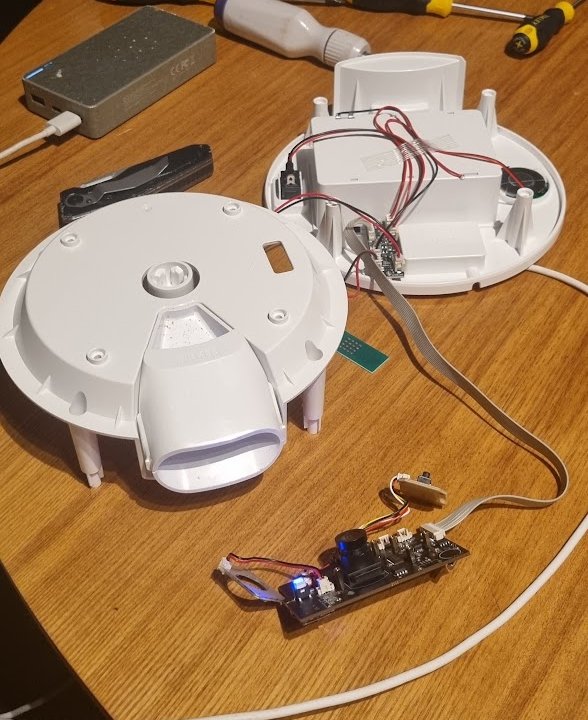
| Part | Chip |
|---|---|
| SoC | Ingenic T31L (MIPS, 64 MB RAM) |
| Image sensor | SmartSens SC2336 |
| Wi-Fi | AltoBeam ATBM6012B-X, over USB |
| Flash | Puya P25Q64, 8 MB SPI NOR |
| Feeder MCU | Nuvoton N76E003 (an 8051) |
Everything lives on one main board: SoC, sensor, Wi-Fi, flash and the feeder MCU. The small board mounted on the white plastic is just a daughter board: a ribbon cable in, connectors out, a few transistors and resistors, and the USB-C power input.
That's good news on every line. The T31 is Thingino's best-supported SoC, the sensor and Wi-Fi chip are both supported, and the Galayou Y4 camera uses the exact same T31L + SC2336 + ATBM6012B-X combination, so there was a profile to start from.
The second best news: the T31 doesn't drive the motor itself. The N76E003 does, through a motor driver chip. It counts portions with a limit switch that clicks once per portion, watches an IR beam across the hopper for the food level, and keeps the time with an RTC so the feeder can run its schedule on batteries. A separate MCU means the T31 talks to it over a serial line, which is much easier to reproduce than motor control on GPIOs.
Dumping the flash, and the 5 V trap
Before writing anything, I wanted a full dump of the original firmware: it's the way back, and it's where the interesting stuff lives. I ordered the classic black CH341A programmer with a SOIC-8 clip.
The classic black CH341A board (mine has the newer CH341B chip on it, same story) has a known flaw: it powers the chip with 3.3 V, but drives the data lines at 5 V. The P25Q64 is a 3.3 V part. With the programmer plugged in and nothing in the socket, the multimeter said 3.3 V on VCC and 5.1 V on chip select. Not something to clip onto a board you want to keep.
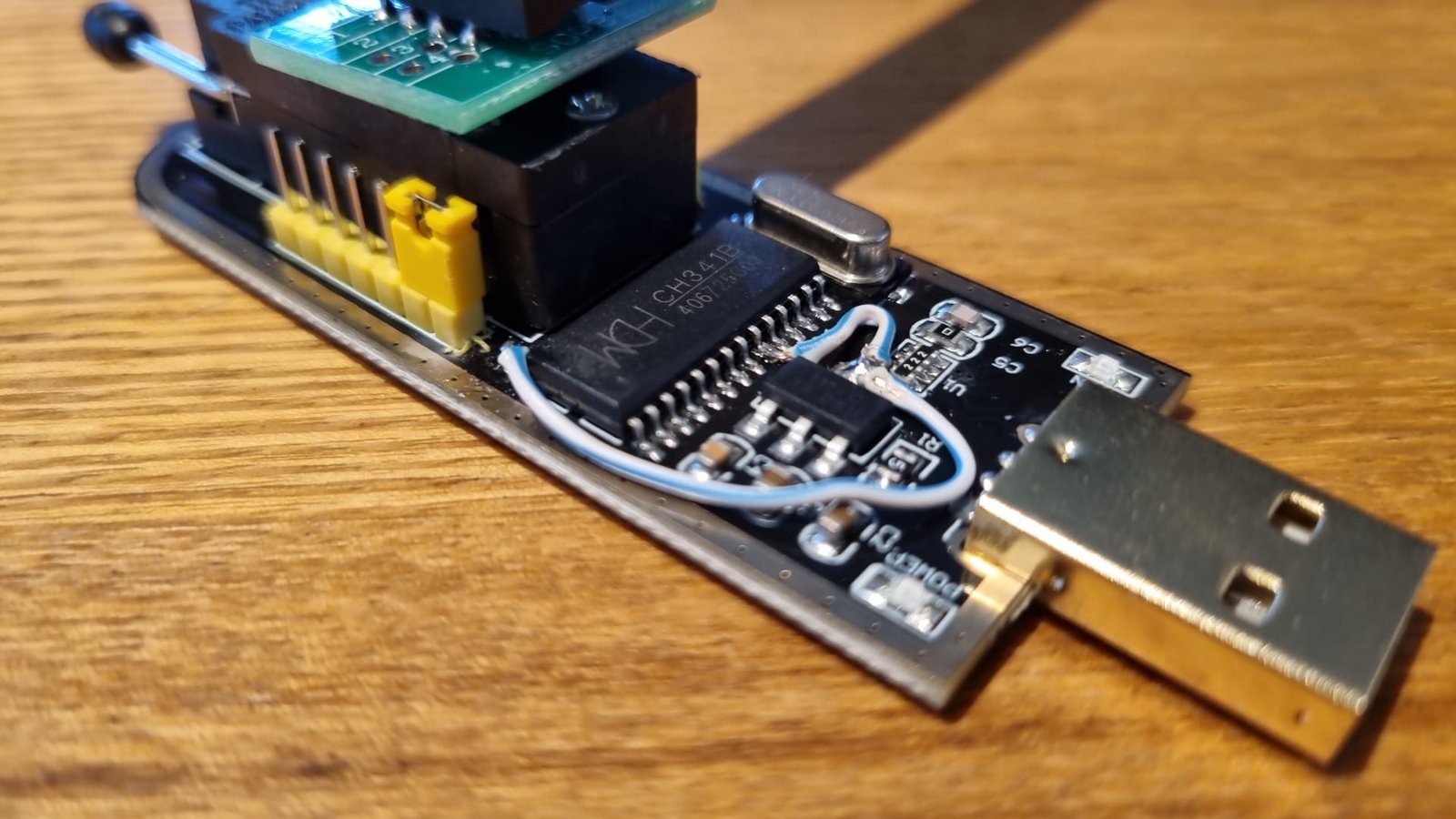
The fix is a well-known mod: lift pin 28 (VCC) of the CH341 chip and wire it, together with pin 9 (V3), to the output of the AMS1117 3.3 V regulator on the same board. After that the socket's data pins measured 3.3 V.
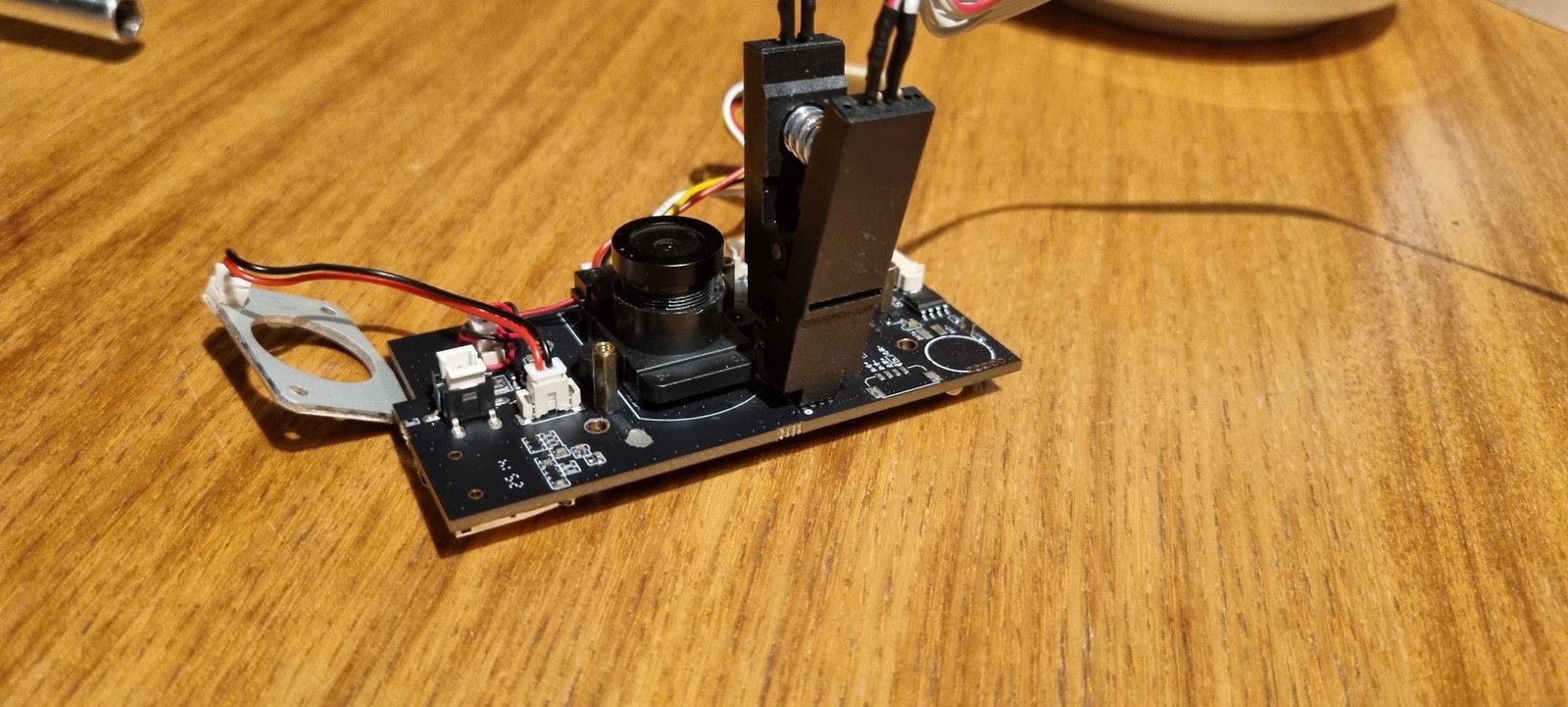
The flash sits so close to the lens module that the clip doesn't fit as it comes. Anyone doing this will have to trim the clip's plastic on the lens side. A couple of minutes and a sharp Stanley knife did the job, but be patient and careful: you're cutting right next to the contacts.
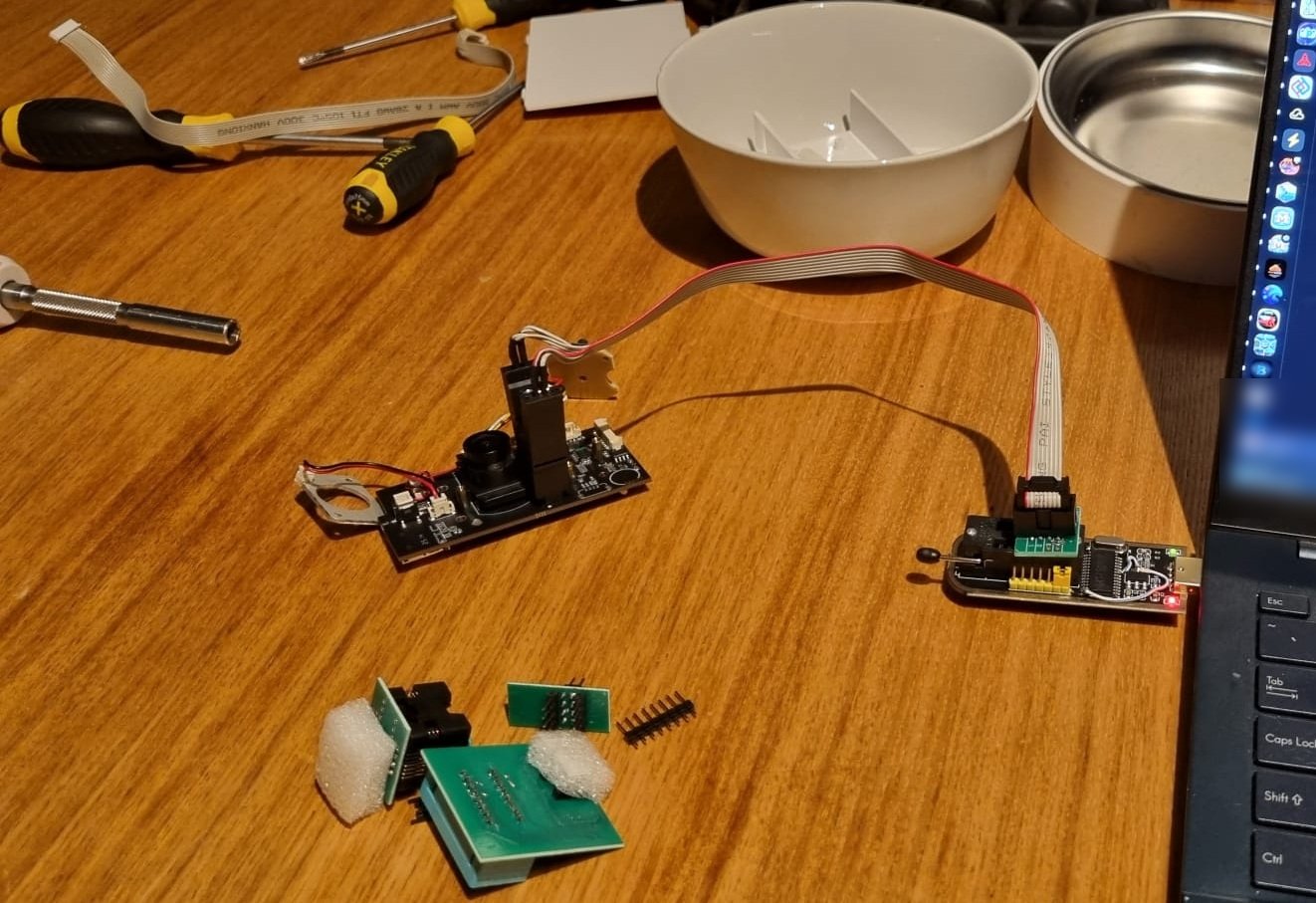
Two reads with flashrom -p ch341a_spi -r, two identical checksums, 8 MB of firmware.
Reading the dump
The U-Boot environment has the partition table: U-Boot, a kernel, a squashfs root, a squashfs "app" partition and a small jffs2 config partition. The config partition holds the device's Tuya keys and my Wi-Fi password.
The app partition contains /app/bin/ipc, the Tuya app that does everything: video, cloud, and the feeder. Its
strings gave away the important part: it opens /dev/ttyS0 and speaks the
Tuya MCU serial protocol
(55 AA frames, DPID_MANUAL_FEED, FEED_REPORT). So the feeder MCU thinks the camera is a Tuya Wi-Fi module.
Reading the protocol from a binary is slow. Watching it is faster, and that needs a shell. To my surprise, the
stock firmware ships with telnetd and a pretty complete BusyBox: wget, top, vi, watch, lsof, devmem,
i2cdump, setserial, even whois. Yet there's no printf, stty, hexdump or wc. The root password is
unknown, but the app partition runs a startup script, and the stock script even has a commented-out
#telnetd & in it. So: unpack the squashfs, add /usr/sbin/telnetd -l /bin/sh &, repack it with the same
compression and block size, splice it back into a copy of the dump at the partition's offset, and check that only
bytes inside the app partition changed. Write it, boot, and telnet gives a root shell.
strace as a logic analyzer
I had a logic analyzer on order, but with a shell on the device there's a shortcut: watch the Tuya app's own reads
and writes on the serial port. A static MIPS build of strace, attached to ipc and filtered to the file
descriptor of /dev/ttyS0:
strace -f -tt -xx -e trace=read,write -e trace-fds=3 -p <ipc pid> -o /tmp/uart.logThen feed from the app, press the buttons, cover the food sensor, and decode the log. What came out:
| What | On the wire |
|---|---|
| Feed N portions | set DP 203 = N |
| Portions dispensed | DP 215 = N, reported once when done |
| Food low | DP 214, bit 1 |
| Feed button pressed | the MCU feeds by itself and reports 215 = 1 |
| "Mic" button | DP 240 (short press) and 241 (held) |
| Keepalive | the MCU sends a heartbeat every second and asks for the time every ~30 s |
The cloud's data points 231 and 238 from the first attempt are just the app's own numbering for 203 and 215. The proof was one line typed into the shell, with the motor out of the mechanism and sitting on its limit switch:
echo -ne '\x55\xaa\x13\x06\x00\x08\xcb\x02\x00\x04\x00\x00\x00\x01\xf2' > /dev/ttyS0One rotation, and a 215 = 1 back from the MCU.
The LED that isn't a data point
The front LED wasn't on any GPIO I could toggle, and the MCU has no data point for it. It turned out to be the Tuya "network status" command: the Wi-Fi module tells the MCU its connection state (0 to 6), and the MCU turns that into a blink pattern. 0 is a slow blink, 2 fast, 4 steady on. 3 is the "not happy" double blink, except when it just goes dark and stays dark, so I don't use it.
And 7, which doesn't exist in the protocol, turns it off, cleanly and reliably. That's the one I wanted most: it's the only light on the device and it's annoying at night. Switching between 4 and 7 every 150 ms also gives crisp custom blinks, because the MCU acknowledges each command within ~160 ms.
One more find: the MCU falls back to its "no network" blink when nobody answers its heartbeat. Whatever runs on the camera has to keep answering, every second, forever.
Doom
With a root shell, an MCU feed command and a free evening, there was really only one thing left to do. Doom runs on the cat feeder: doom-ascii cross-compiled for MIPS, played over telnet, and every real kill in the game feeds a portion. Demo kills don't count. The cat was not consulted.
A Thingino profile
The Galayou Y4 profile was the starting point, minus the parts that don't exist on a feeder: its pan/tilt motor
GPIOs clash with pins this board uses for other things, and its buttons and LEDs are MCU-driven here. The SoC
variant was read straight from registers with devmem, because Thingino's soc script needs printf and the
stock BusyBox doesn't have it.
The first Thingino image booted fine, and had no /dev/ttyS0: only the console UART was enabled. Two lines in
the profile fixed that:
BR2_PACKAGE_THINGINO_KOPT_UART=y
BR2_PACKAGE_THINGINO_KOPT_UART_UART0=y
Worth knowing: Thingino doesn't use the stock MAC address, it derives one starting with 02:. So look for the
feeder by its hostname in your DHCP leases, not by its old MAC.
Flashing over usbipd is slow
My laptop runs Windows, so the first write went through WSL with the programmer passed in over usbipd. Reading
was fine. Writing crawled at about 0.65 MB per minute, because every 256-byte page means several USB round trips
over a virtual network, and I gave up after 75 minutes. The same programmer passed through to a Linux VM on one of
my servers did the full write and verify in about 10 minutes. After that one write, every update goes over the
network with Thingino's make ota, and the clip is only there to unbrick.
Finding the night vision
The board has IR LEDs and an IR-cut filter, but which GPIOs? The stock app held a handful of pins as outputs, so the method was to toggle them one by one while watching. GPIO 59 gave a faint red glow I could just see with my own eyes, and through a phone camera (which picks up 850 nm infrared) the IR LEDs were bright and obvious. The IR-cut filter is a little coil that moves a filter in front of the sensor, and it makes an audible tick when pulsed: GPIOs 10 and 11, one for each direction.
feederd
The last piece is the job the Tuya app did: talk to the MCU, and give the rest of the house a way to feed. That's
feederd, a single C++ file and a single poll() loop over the serial port and an MQTT socket. It answers the
heartbeat and time requests, sends feed commands, and turns the MCU's reports into MQTT topics. I considered Rust,
but MIPS is a tier 3 target that needs nightly, and the binary would likely have been two to four times the
~130 KB the C++ version is. It's linked against the image's own uClibc and libmosquitto, with libstdc++ linked statically.
The topics follow the pattern of my other MQTT bridges: every topic is two-way. feederd publishes the real state,
retained, and listens on the same topic for changes. Write 5 to .../feed and it shows 5 while dispensing,
then 0. That pattern needs a few rules to not shoot itself in the foot:
- feederd remembers what it published and skips the echo, so its own status update never becomes a command.
- Anything that arrives with the retain flag (replayed by the broker on subscribe) is old state, never a command. Otherwise a reboot during a feed would feed again.
- An invalid write, or a write to a read-only topic, gets the real state published back. The topic never lies.
The rest: food (ok/low), led (off, on, slow_blink, fast_blink, and idle for a configurable
default), aux-button for the "mic" button, last-feed as JSON with the source (mqtt or button), lifetime
and daily portion counters, and an online topic with a last will. The daily counter resets at 04:00, so the
cat's after-midnight complaints count towards the day they belong to.
Counters live in a state file on the flash, written only when food drops. If the file is missing, which happens after a full reflash, feederd adopts the broker's retained lifetime total before publishing anything, so the Grafana graph never dips to zero.
What I didn't touch: schedules, speaker and mic
The Tuya app lets you set a feeding schedule, and I haven't decoded how that works. My guess is that the MCU runs
it. It has its own real-time clock and an EEPROM for settings, the host sends it the local time every 30 seconds,
and the base has room for three D cells (I don't use them). That points at a feeder that keeps feeding on schedule
during a power cut, while the T31, the camera and feederd are off. I haven't verified that, though, and there's
a counter-argument: the stock app also keeps the schedule itself, in /conf/tuya/gv_feeder_schedule.json on the
camera side, and when queried, the MCU only reported the button, food-sensor and dispense data points, nothing
that looks like a schedule.
Some pointers for anyone who wants to dig into it:
- Sniff it. With the telnet image and strace from earlier, change the schedule in the Tuya app and see what
goes over
/dev/ttyS0. None of my captures contain schedule traffic, because I never touched the schedule while sniffing. In the cloud API it's data point 236 ("meal plan"), and the stock app has handlers calledDPID_MEAL_PLANandhandle_DP_feeder_schedule_new. - Read the EEPROM. The stock BusyBox has
i2cdump, and the P24C02A is only 256 bytes. Dump it before and after changing the schedule. - Test it. Set a schedule on stock firmware, unplug the power with batteries in, and watch whether food drops at the scheduled time.
On the Thingino side that has one practical consequence: if the MCU does store a schedule, a schedule you set
before flashing could keep firing. Clear it in the Tuya app before you flash, or keep an eye on the last-feed
topic for feeds with the button source that nobody pressed for.
The speaker and microphone are mostly untested with Thingino. I don't need them: when I closed everything back up I left the microphone out and disconnected the speaker. The microphone was never tried. The speaker played one test sound with GPIO 50 (the amplifier enable) driven high, and I stopped there, so it's probably not far off if you want it.
Running it yourself
Everything is in the repository, with a step-by-step flashing guide. The short version:
-
Check your board. T31L, SC2336, ATBM6012B-X, P25Q64, N76E003. Different chips need a different profile.
-
Check your programmer. Measure chip select on the empty socket. 5 V means the 3.3 V mod first.
-
Dump twice, compare the checksums, and keep the dump private.
-
Build Thingino with the profile from the repo. Copy the repo's
thingino/folder into the Thingino checkout and fill in the overlay with your own values:user/princess_feeder_t31l_sc2336_atbm6012bx/overlay/ etc/wpa_supplicant.conf your SSID + wpa_passphrase output (2.4 GHz) root/.ssh/authorized_keys your public key etc/hostname pet-feeder, or whatever you like etc/timezone, etc/TZ your time zone etc/feederd.conf your MQTT broker and topic prefixCAMERA=princess_feeder_t31l_sc2336_atbm6012bx make # first build, builds the toolchain too make -C /path/to/repo/feederd THINGINO=$PWD overlay # build feederd, put it in the overlay CAMERA=princess_feeder_t31l_sc2336_atbm6012bx make repack -
Write it with
flashrom -p ch341a_spi -w, from a real Linux USB port. -
First boot: SSH in with your key, set a root password, and flip the image (the camera is mounted upside down in the assembled feeder):
raptorctl config set image hflip 1 raptorctl config set image vflip 1 raptorctl config save -
Video:
rtsp://thingino:thingino@<feeder-ip>:554/ch0(main) and/ch1(sub). Change that password. -
Home Assistant: paste
home-assistant/pet-feeder.yamlinto themqtt:section of your configuration. You get a Feed number, a Feed 1 Portion button, an LED select, Food Low and Feeding sensors, portion counters and the last feed.
Things that will bite you:
- Deactivate any Python virtualenv before building Thingino. U-Boot's build wants the system Python's
setuptoolsand fails onpylibfdtotherwise. makedoes nothing once the image exists. Overlay changes needmake repack; a change to the profile'sthingino.jsonneedsmake cleanbuild.- A full OTA wipes the writable overlay. Redo the image flip afterwards. feederd and your overlay files are baked into the image, so those survive.
Final thoughts
The feeder now lives on an isolated camera network with no internet access at all. The video stays on my own network, ready for my NVR, Home Assistant feeds the cat with a button or an automation, and there's a "food low" sensor that Home Assistant never had while the feeder was on Tuya.
The parts that made this go quickly weren't clever: a dump before touching anything, a separate MCU instead of motor control on GPIOs, and watching a working implementation (the stock app with strace) instead of reversing it from the binary. The undocumented LED-off value and the voltage on that programmer were the only real surprises.
Sources
- WouterGritter/princess-feeder-thingino: the Thingino profile, feederd, the Home Assistant config, and docs on the hardware, flashing and the MCU protocol.
- Thingino: the open firmware for Ingenic cameras this builds on.
- Tuya MCU serial protocol: the framing and commands the feeder's MCU speaks.
- flashrom: reading and writing the SPI flash with the CH341A.
- doom-ascii: Doom in a terminal, which is apparently all a cat feeder needs.
Comments